Replace the characters
Every survivor and every zombie wears one of Unreal's own mannequins, Manny or Quinn, on one skeleton. You add a third body, Athletic, skinned to that skeleton. You offer it at character creation, dress it and give it to the zombies.
Before you start
- A character mesh of your own, skinned to the mannequin skeleton in your modelling tool, in the same rest pose as the shipped bodies.
- A modelling tool that can paint a colour attribute named
Zoneon the vertices.
Read section 3 of THIRD-PARTY.md first. The shipped bodies, their skeleton and the template clips
are Epic Games content, under other terms than the rest of the pack.
What a body must fit
| Part | Where | What it needs |
|---|---|---|
| Skeleton | Content/ZombieSurvival/Meshes/Characters/SKEL_Mannequin |
Epic's SK_Mannequin from the Third Person template, 161 bones. Bodies, clothes, bags and every character clip are on it. |
| Animation Blueprints | Blueprints/Player/ABP_Survivor, Blueprints/AI/ABP_Zombie |
Both target SKEL_Mannequin. |
| Clips | the slots of DataAssets/Animation/DA_AnimSet_Survivor_Base and DA_AnimSet_Zombie_Base |
Clips on SKEL_Mannequin, played as dynamic montages. There is no montage asset to rebuild. |
| Locomotion | Animations/Shared/BS_Survivor_Locomotion |
27 samples: Direction on X, Speed on Y, the walk row on BP_Survivor.WalkSpeed, the jog row on RunSpeed. |
| Sockets of the body mesh | as on Meshes/Characters/Body/SK_Character_Male |
WeaponSocket on the right hand; belt_l, belt_r, holster_r and back for the stowed weapons. |
| Physics asset | as PA_Character_Male |
Bodies on the head, the neck and the feet at least, so the closest-bone lookup reaches every zone. |
| Wound zones | BoneToPart on Blueprints/ActorComponents/AC_Wounds, and on the Wounds component of BP_Survivor |
25 bone names mapped to the 17 body zones. |
Zone vertex colour |
on the body mesh | Red is the body zone, green the hiding sub-zone. Without it the clothes do not hide the skin, and the skin shows no blood or dirt. |
On the same skeleton, the clips, the blend space, the sockets' bones and BoneToPart keep working as
they are.
Steps
1. Paint the zones
Paint a colour attribute named Zone on your body. This step has not been played as written.
- Red is the rank of the body zone under the vertex divided by 16, from 0 for the head to 16 for the lower torso. Add a piece of clothing has the table of the seventeen ranks.
- Green is the number of the hiding sub-zone divided by 8: 1 and 2 for the top of the thighs, 4 and 5 for the bottom of the shins, 6 and 7 for the thighs down to a shorts hem.
2. Import the body
- Import your mesh into
Content/ZombieSurvival/Meshes/Characters/Body/asSK_Character_Athletic. - In the import options, pick
SKEL_Mannequinas the skeleton and set Vertex Color Import Option to Replace. - Give its material slots
Materials/Characters/M_Character_Skin, as on the shipped bodies. The game puts the skin tone on both material slots of the body.
An FBX brings the mesh, its skin weights and its colours, but not the sockets. This import was played with Manny's own mesh, exported and imported back: no body of another shape has been tried.
3. Add the physics asset and the sockets
- Create
PA_Character_Athleticnext to the mesh, with bodies on at least the head, the neck and the feet, and assign it to the mesh. - Open
SK_Character_Maleand note where its sockets sit. AddWeaponSocket,belt_l,belt_r,holster_randbackto your mesh at the same places. WithoutWeaponSocket, the weapon in hand does not attach.
4. Offer the body at character creation
- Open
Content/ZombieSurvival/DataAssets/Characters/Childs/DA_AppearanceOptions_Default. - In
Morphologies, add the keyAthleticwithMesh=SK_Character_AthleticandPhysicsAsset=PA_Character_Athletic. The key is what the saves and the network carry. - Open
Content/ZombieSurvival/Localization/ST_Menusand add the entryCreation.Athletic=Athletic. The creation screen names each body byCreation.<key>:Creation.Malereads Manny. - Save both.
The look of a survivor is a body and a skin tone. There are no hairstyles or beards.
5. Dress it
Each piece of clothing has one skeletal mesh per body, keyed in Meshes of its DA_Clothing_*. A
body with no mesh under its key gets the mesh of the first key, made for another body.
- For each piece you want on the Athletic body, make a mesh on your body:
SK_Cloth_<Id>_Athletic, inMeshes/Clothing/, onSKEL_Mannequin, with the sameZonecolour. It follows the rules for clothing meshes. - Add it under the key
AthleticinMeshesof that piece.
The starting clothes come from the occupation or the outfit picked at creation. This step has not been played as written.
6. Put it on the zombies
- Open each archetype in
Content/ZombieSurvival/DataAssets/Zombies/Childs/:DA_Zombie_Resident,DA_Zombie_Workerand the others. - In
BodyVariants, add an entry withMesh=SK_Character_Athletic, andMaterials/Characters/MI_Zombie_Skinin each slot ofMaterials.
The host draws one entry per zombie.
7. Try it
- Open
Content/ZombieSurvival/Maps/L_Bootand press Play, then NEW GAME and START. -
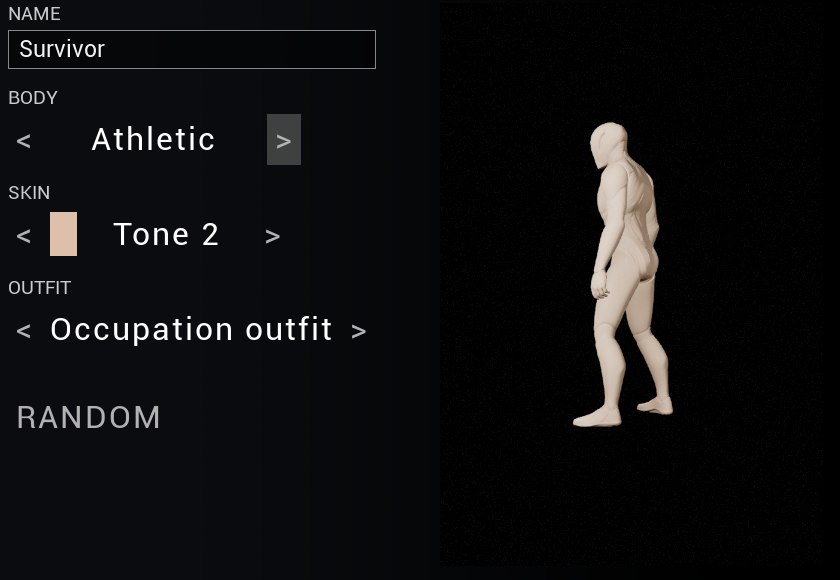
On the first page of character creation, step the body row to Athletic, after Manny and Quinn, and pick a skin tone. The preview on the right shows your body in that tone, and turns when you drag it with the mouse.
-
PLAY. Walk, run (Left Shift) and aim (hold right mouse). The aim pose plays on the upper body while the legs walk, and the clothes hide the skin under them.
- Equip the baseball bat of the starting kit. It sits in the right hand.
- Stow a weapon from its item menu (right-click its row in the bag). It hangs at the socket of its
position:
belt_l,belt_r,holster_rorback. A long weapon goes on the back only with a backpack or a rifle sling. - Let a zombie hit you, then open the health window (H). The wound shows on the zone that was hit. Wounds on a new body have not been tried.
- Look at the zombies: some wear your body.
If it does not work
- The body row shows a key or nothing: the
Creation.<key>entry is missing fromST_Menus. - The body is offered but a mannequin appears: the
Morphologiesentry names another mesh, or the asset was not saved. - The weapon floats or stays at the feet:
WeaponSocket, or a belt or back socket, is missing or misplaced. - Skin shows through clothes, or no blood appears: the
Zonecolour is missing, or the import did not use Replace. - Wounds land on the wrong zone: the physics asset lacks bodies near those bones.
- Clothes do not fit: the piece has no mesh under your key and falls back on the first key.
Remove Manny and Quinn
Once the Athletic body works:
- Remove the
MaleandFemalekeys fromMorphologies, and setDefaultAppearancesto your key. These are the looks given to survivors who never chose one. - Give every clothing piece a mesh under your key. Survivors no longer read the meshes under
MaleandFemaleonce no body uses those keys. - Replace the Manny and Quinn entries of every
BodyVariants, and the fallbackBodyMeshandBodyMaterialof every archetype.
A saved or received look whose body key is unknown becomes the first default appearance. It is never
refused. The skeleton is still SKEL_Mannequin, which is Epic's: read THIRD-PARTY.md before you
redistribute.
Another skeleton
This route is not documented. Everything that plays on a character names SKEL_Mannequin: the two
Animation Blueprints, the clips of the animation sets, the locomotion blend space and the clothing
meshes. Either skin your character to SKEL_Mannequin, as above, or retarget the clips to your
skeleton with Unreal Engine's IK Rig and IK Retargeter, then rebuild every part of the table in What
a body must fit, and the aim poses.
To swap a clip without touching the skeleton, point its slot at your clip in the base set. Keep the hit reactions additive: they feed an Apply Additive node, so that a flinch plays over a walk.