Give a map its world map
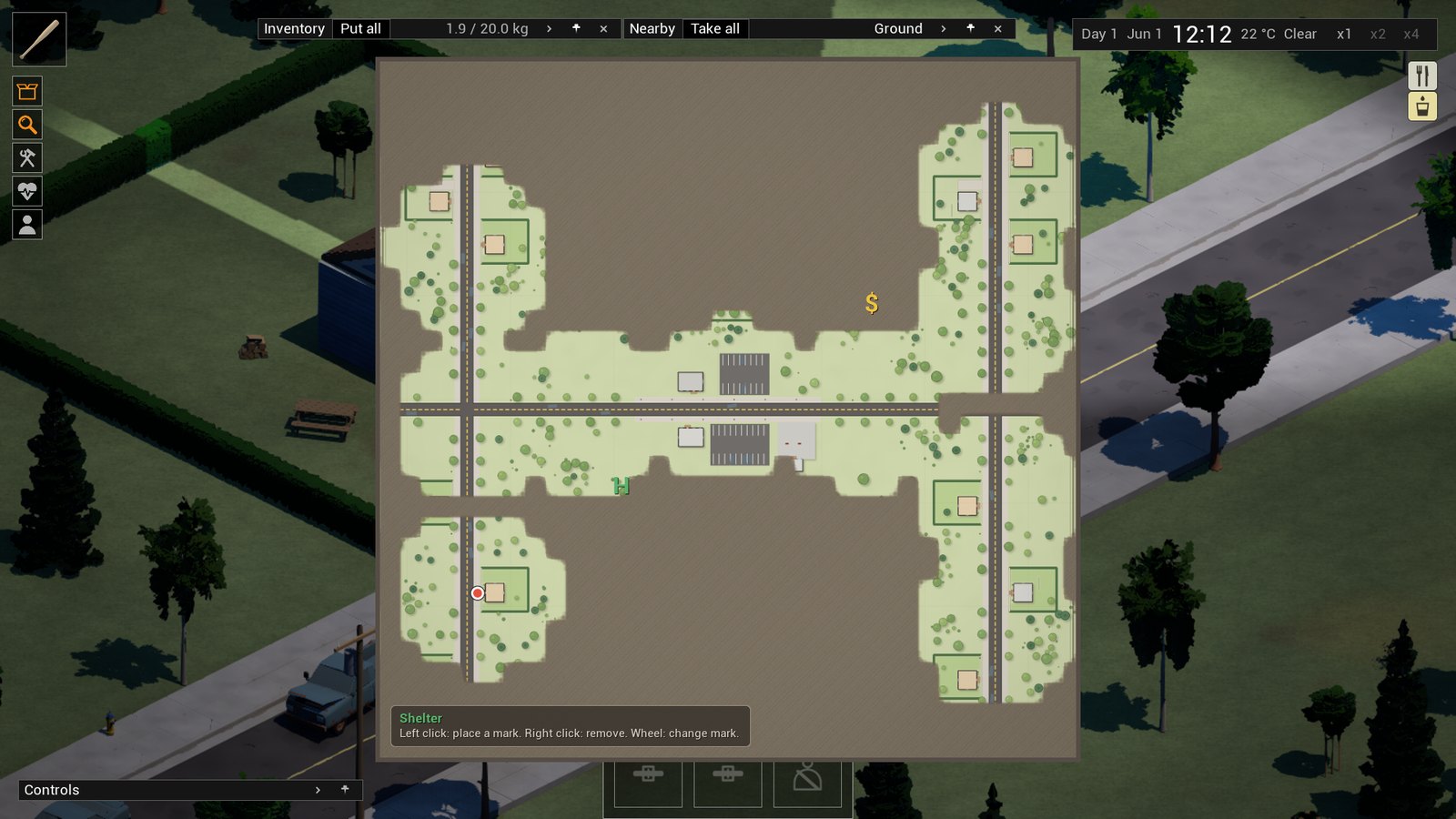
The world map (M) shows the level from above. It opens as the survivor explores and holds up to
200 marks per player. A level has one when its placed BP_ZoneManager has a MapDef.
Make the image
The image is any top-down picture of a square of the level. Its right is +X, its bottom +Y, and its
corners are WorldMin and WorldMax. The square does not have to be the whole level: Pine Hollow's
covers the town and its edges (336 m, from 8,700 to 42,300 uu), so the town fills the window. Outside
the square, the survivor is off the map.
Pine Hollow's image is drawn: roads, buildings in plan with their windows and doors, gardens, trees. To make one for your level:
- Open the level and load every cell: in the World Partition window, select all, then Load Region From Selection.
- Place a
SceneCapture2Dabove the centre of the square:- rotation pitch -90 and yaw -90;
- Projection Type Orthographic, Ortho Width the width of the square;
- Capture Source "Base Color";
- a new 2048 × 2048 render target as Texture Target;
- in Show Flag Settings, Instanced Foliage, Foliage and Instanced Grass off.
- Capture once. If the image comes out almost black, the shaders were still compiling: wait a moment and capture again.
- Export the render target as a PNG, then paint over it in any image editor. Flat colours for the ground, roads and roofs read better on a map than the capture itself.
- Import the PNG under
Textures/UI/Map/, or reimport it over an existing map texture. Set sRGB on, Compression BC7, Texture Group UI, Mip Gen Settings Simple Average and Never Stream on. - Delete the capture actor and the render target.
You can also draw the image from scratch, as long as its square matches WorldMin and WorldMax.
Plug it in
- Create a Data Asset of the class
PDA_WorldMapDef, one per level. The class is inContent/ZombieSurvival/DataAssets/Map/. SetTextureto the image, andWorldMinandWorldMaxto the corners of the square, in uu. - Set it as
MapDefon the level'sBP_ZoneManagerinstance.
The window shows the image as it is. Its material, M_MapPaper, adds the unexplored part as old
paper with a soft edge, a light vignette, and the markers of the player (red) and of the partners
(blue).
Settings of the map window
One PDA_MapSettings serves every map: DataAssets/Map/Childs/DA_MapSettings_Default.
| Field | What it does | Default |
|---|---|---|
MapKey |
Opens and closes the map window. The key is not in the input mapping context. | M |
CellSize, RevealRadius, RevealSeconds |
The explored grid, how far around the survivor it opens, how often. | 1000 uu, 4000 uu, 1 s |
MaxSymbols, RemoveRadius |
Marks per player, and how close a right click must be to remove one. | 200, 1500 uu |
SymbolKinds |
Each kind of mark: a label from ST_Menus, one or two characters, a colour. Add an entry for a new kind. |
Six |
bMiniMap, MiniMapRadius |
The mini-map, top right, north up. | Off, 6000 uu |
There is no zoom and no scrolling: the whole level fits on screen. The explored grid has at most 45
cells a side, so a larger square gets larger cells. Pine Hollow keeps the 1000 uu (10 m) of CellSize. Found
maps, a start on the map, notes and marks shared between players are not in this release.
Test it
- Open
Content/ZombieSurvival/Maps/L_World, which has a world map, or your level, and press Play. - Press M. The map window opens, and the area around the survivor is revealed as you walk.
- Left click places a mark, the mouse wheel changes its kind, and right click removes the nearest one.