Player vision and occlusion
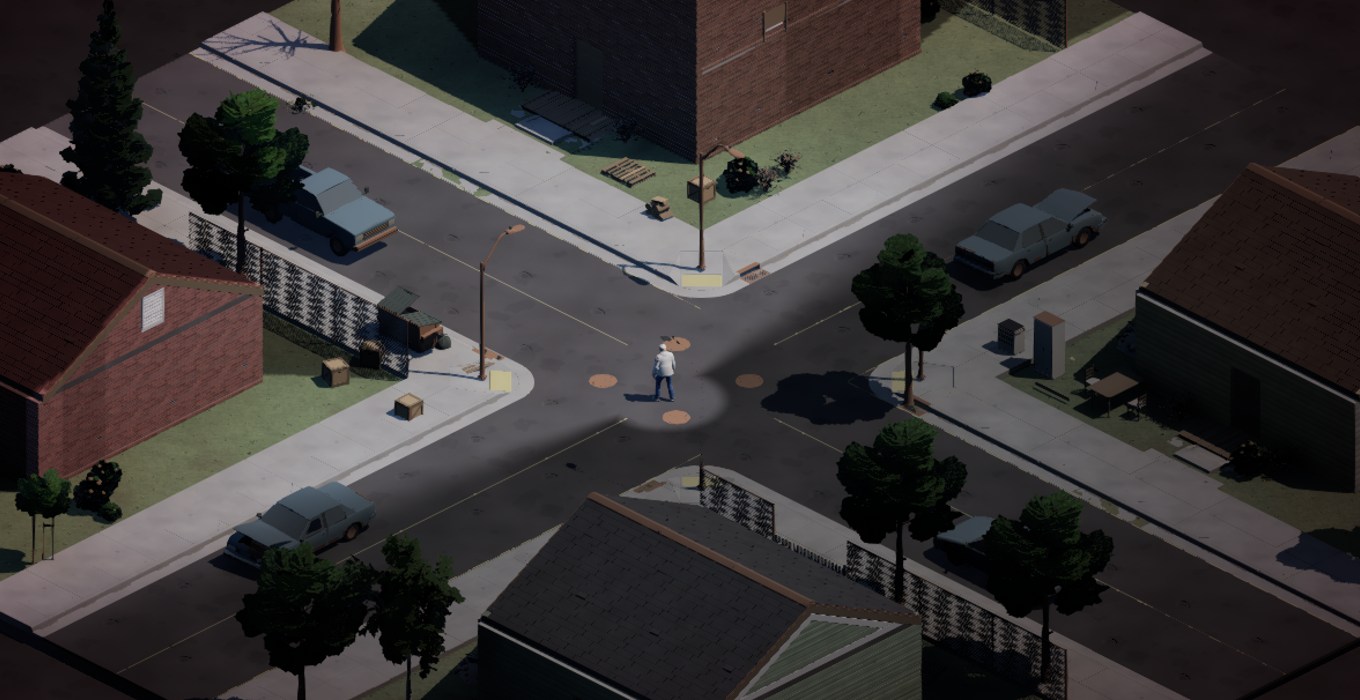
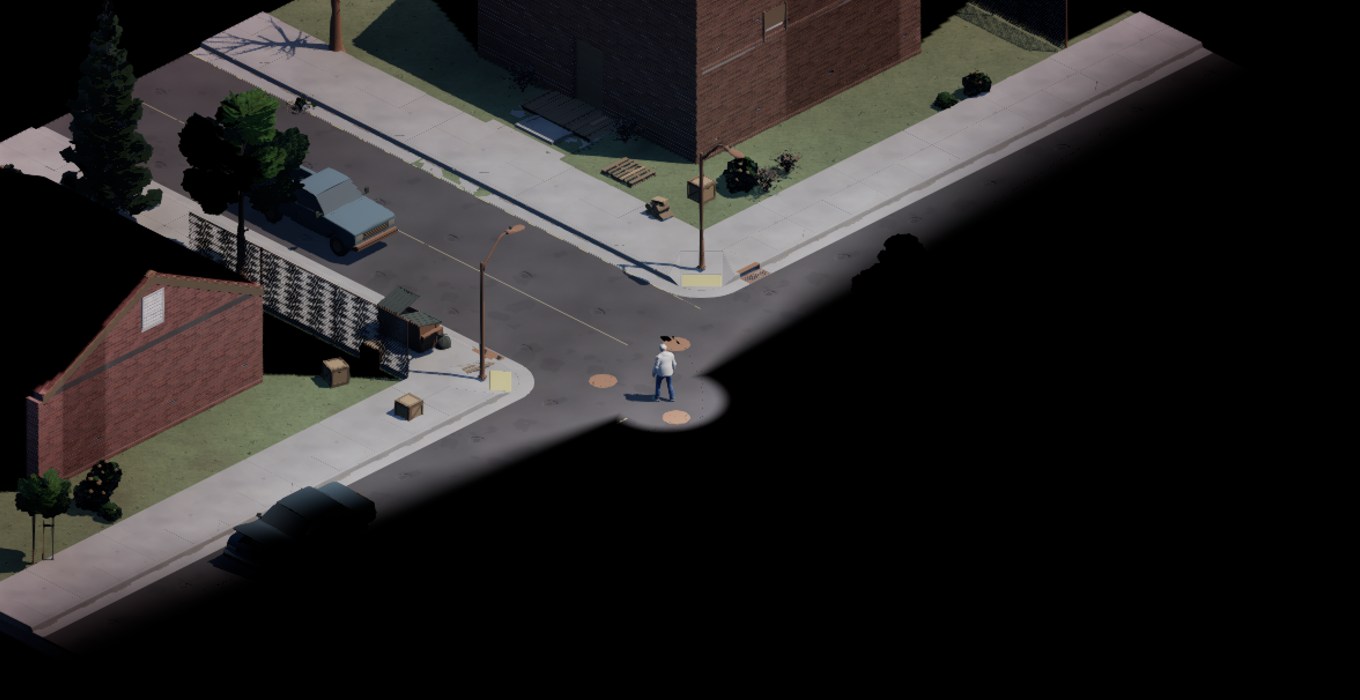
You see what your survivor sees. Everything outside their cone of vision, or behind a wall, is darker and greyer, and zombies there fade out. Step into a building and the walls between the camera and you disappear, so you read the room you are standing in.
In the game
The cone
Each player sees through their own cone, on their own machine. Zombies and other survivors fade in and out with the clothes they wear. A survivor you cannot see also hides the light they carry. Fog veils the picture but does not shorten the cone.
A wall or a building stops the cone and hides what is behind it. A car does not by default. Hedges, bushes and grass have no collision and hide nothing.
Thin street props do not cut the cone either: lamp posts, utility poles, mailboxes, hydrants, signs and tree trunks. They still block characters, vehicles and shots.
Inside a building
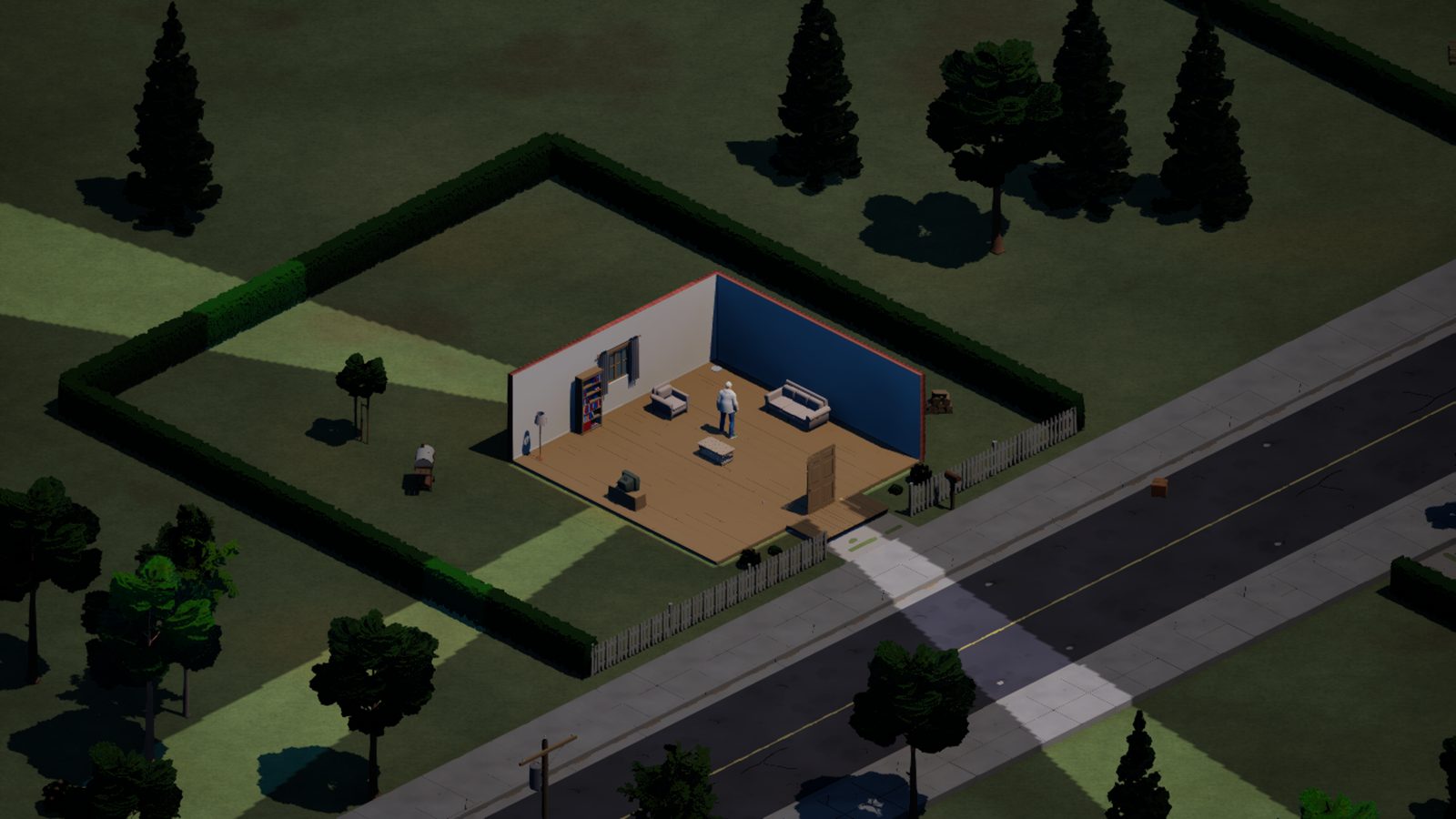
Each building has one vision zone. While you stand inside it, the walls between the camera and you are hidden whole, with the windows set in them, and so is everything above your storey. A wall is hidden at once, with no dissolve, whatever its material, and it keeps its collision. Seen from outside, a building is always complete: walls do not hide when you walk past it or aim behind it.
The door you came in by stays, so you can open and close it from inside. The door frame goes with the wall.
A container the spawn plan puts upstairs, or an item dropped there, is hidden with the upper floor while you are downstairs. A wall you build is never hidden, and keeps blocking sight and movement when you step inside.
Outside
When a wall, a roof, a tree, a hedge or a car stands between the camera and the survivor, that surface opens a small dithered disc around them, the ground spared. By default the walls, the roofs, the vegetation, the car paint, the dirty glass, the signs and the awnings open, and not the ground, the items, the lights or the survivor.
When a thinner prop, a wreck or a lamp post hides the survivor, the hidden part is drawn as a pale silhouette, clothes included.
A survivor seated in a vehicle has no silhouette, and on their own screen the car they sit in opens no disc, so nobody sees through the car.
Outlines
An item on the ground gets a thin warm outline once you are within reach of it. The proximity highlight decides when. The outline never shows through a wall or a roof.
While you aim, the zombie your next swing would hit is outlined the same way. It is the nearest zombie within 120 uu of the ground reticule.
An outline varies by a pixel or two from frame to frame, and an item partly hidden behind the survivor shows a broken ring over the survivor's legs.
The assets
The cone is set in Content/ZombieSurvival/DataAssets/Vision/Childs/DA_Vision_Default, and the
post-process material Materials/Shared/M_PP_Vision (instance MI_PP_Vision) darkens the picture
outside it. Blueprints/ActorComponents/AC_VisionSource, on the survivor, casts the cone. The zone
is Blueprints/World/BP_VisionZone.
Materials/Shared/MF_WallCutaway, in M_Building, draws the dithered disc for every material
instance whose CutawayEnabled is 1. The post-process material
Materials/Shared/M_PP_PlayerSilhouette draws the silhouette and both outlines, and each map lists
it in its PostProcessVolume. The silhouette and the outlines rest on one project setting,
r.CustomDepth=3 in Config/DefaultEngine.ini.
| Asset | Property | Default | What it does |
|---|---|---|---|
DataAssets/Vision/Childs/DA_Vision_Default |
ConeHalfAngleDeg |
80 | Half-angle of the vision cone, in degrees. |
DA_Vision_Default |
ViewDistance |
3000 uu | How far the cone reaches. |
DA_Vision_Default |
NearRadius |
200 | Radius around the survivor inside which a target is seen even outside the cone. |
DA_Vision_Default |
OutsideDarkness |
0.42 | Share of the brightness kept outside the cone: lower is darker, 0 is black. |
DA_Vision_Default |
OutsideDesaturation |
0.28 | How grey the world is outside the cone. |
DA_Vision_Default |
FadeSpeed |
14 | How fast a zombie fades in and out. |
DA_Vision_Default |
HiddenDelay |
0.15 | Delay before a faded-out target is hidden. |
AC_VisionSource |
OccluderObjectTypes |
WorldStatic | Object types that stop the cone. |
BP_VisionZone |
HalfExtent |
600 x 600 x 300 | Half the size of the zone box (a box of 1200 x 1200 x 600 uu). |
BP_VisionZone |
KeepVisibleClasses |
BP_Door |
Classes the zone never hides. |
BP_VisionZone |
bAutoCollectOccluders |
true | Collects the tagged walls when Occluders is empty, keeps those on the camera side, and collects again when the player walks in. |
BP_VisionZone |
OccluderTag |
VisionOccluder |
The actor tag it collects. |
BP_VisionZone |
StoreyContentClasses |
BP_Container, BP_ItemPickup |
Classes hidden with an upper storey. BP_Built is left out. Never add it, or a character, to the list. |
BP_VisionZone |
StoreyFloorTolerance |
25 uu | How far below the storey line a mesh may sit and still count as upstairs. |
Materials/Shared/M_PP_PlayerSilhouette |
OutlineOffsetPixels |
2 | Pixel offset of the outline's edge detector (group Outline). |
Blueprints/Player/BP_Survivor (Class Defaults) |
OutlineTargetRadius |
120 uu | How close to the ground reticule a zombie must be to be outlined as the next target. |
Materials/Shared/MPC_Vision |
CutawayRadius, CutawayDepth |
320, 60 | Size of the dithered disc around the survivor. |
Each material instance of M_Building |
CutawayEnabled |
1 on walls, roofs, vegetation, cars | 1: the surface opens the dithered disc; 0: it stays solid. |
DA_Vision_Default also holds the edge softness, the mask size, the trace count (TraceCount) and
the update intervals. Every vision setting is read at BeginPlay, so stop and start Play to see a
change.
Note
DA_Vision_Default overrides ViewDistance, FadeSpeed, HiddenDelay, OutsideDarkness and
OutsideDesaturation. Changing those fields on the class PDA_VisionSettings changes nothing
you will see.
Class defaults and instance overrides explains
why.
A zone you place hides nothing until its lists are filled, by hand or from the walls tagged
VisionOccluder inside its box. From the tag, the zone keeps only the walls on its camera side (the
−X and −Y faces), whatever the orientation of a stamped house plan, so the far walls stay up. Zones
may overlap, as the two storeys of a house do. Build a house describes
every setting of the zone.
Change it
- To change the cone, set its angle, reach, darkness and desaturation in
DA_Vision_Default. - To spare a modest machine, lower
TraceCountfirst. It is the number of traces cast per update. - To let a car hide what is behind it, add its object type, Vehicle, to
OccluderObjectTypeson the survivor'sAC_VisionSourcecomponent. - Give your own thin props the WorldDynamic object type, as the shipped street props have, or a single pole next to the survivor throws a long dark wedge across the street.
- To give a building its cutaway, place one
BP_VisionZone, size it to the footprint withHalfExtent, then tag the wallsVisionOccluderor fillOccludersandFloorAboveby hand. - If a Blueprint of yours spawns something upstairs while the player may be downstairs, call
RequestBuildingVisibilityRefreshon the player'sAC_VisionSourceafter the spawn. - To hide doors with their wall, remove
BP_DoorfromKeepVisibleClasses. - To drop the silhouette, remove
M_PP_PlayerSilhouettefrom the map'sPostProcessVolume. The character then disappears behind props, and the outlines of items and of the targeted zombie go too, since the same material draws them. - To change the thickness of the outline, set
OutlineOffsetPixelson the material. - The item outline and the zombie outline are drawn from one stencil value, 2 (the survivor uses 1), so restyling one restyles the other. Two looks need a stencil value of their own for the zombie and a branch of their own in the material.
- To let the survivor show through your own walls, roofs or vegetation, set
CutawayEnabledto 1 on their material instances ofM_Building. 0 keeps a surface solid. - To play in first person, set
bFirstPersoninDA_Vision_Default. It turns the cone darkening and the building cutaway off.