Player count
A hosted game accepts four players at most, the host included: the host and three friends. The number
is MaxPlayers, one field of one Data Asset, and it applies to the whole game, not per world. You set
it to 2, then check that a third player is turned away.
The same number is the capacity the JOIN list shows and the limit past which the host refuses a player, so the two always agree. A world started with NEW GAME is played alone, and nobody can join it.
Before you start
The check runs three games at once on one PC: the host and two clients. On a 32 GB PC, the editor and three games did not fit, and the third game ran out of memory while it started. Close the editor once the asset is saved.
You can also run it across two PCs or over the Internet.
Steps
1. Set the number
- Open
Content/ZombieSurvival/DataAssets/Session/Childs/DA_Session_Default. - Set
MaxPlayersto2. - Save.
2. Host a game
-
Start a first game in its own window, from a command prompt. Replace the first two paths with those of your engine and your project:
"C:\Program Files\Epic Games\UE_5.8\Engine\Binaries\Win64\UnrealEditor.exe" "D:\MyProjects\ZombieSurvival\ZombieSurvival.uproject" /Game/ZombieSurvival/Maps/L_Boot -game -windowed -ResX=960 -ResY=560If the editor is still open, you can instead open
Content/ZombieSurvival/Maps/L_Bootand start it as a Standalone Game (the arrow next to Play). -
HOST, type a name, leave the password empty and choose New world with the WORLD arrows.
- START. On the screen that opens, keep Pine Hollow, then START again, create a character and PLAY.
3. Join with a second game
On one PC, every game needs its own Saved folder. A player's identity is their local profile,
SG_LocalProfile, kept in that folder. Two games that share it are the same player to the host, which
refuses the second with A player with the same identity is already in this game. On two PCs there
is nothing to do.
- Start the second game with the command of step 2, followed by
-saveddirsuffix=Second. It keeps its profile and saves inSaved_Second, next toSaved. Delete that folder when you are done. - JOIN, type a name. The local list shows the host's game as
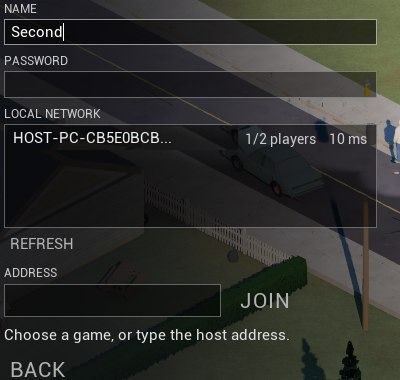
<host machine name>-<id>, with1/2players and the ping. - Click it, create a character and press PLAY. PLAY stays greyed, with no message, until the host has placed your survivor. You are then in the host's world.
4. Try a third
- Start a third game the same way, with
-saveddirsuffix=Third, and JOIN. - A full game leaves the local list, which reads No game found on the local network. Type
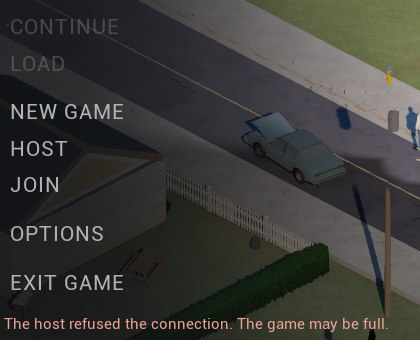
127.0.0.1in the address field and press JOIN. - The third game returns to the main menu with The host refused the connection. The game may be
full. That text is in
DisconnectReasonTextsofDA_Session_Default.
5. Put it back
Set MaxPlayers back to 4, or to the number you want to ship, and save.
Players of a build join only a host of the same version, ProjectVersion in
Config/DefaultGame.ini. Raise it at every release.
If it does not work
- The list still shows /4: the asset was not saved, or
SessionSettingsonBlueprints/Core/BP_ZSGameInstancenames another session asset thanDA_Session_Default. - No game in the list: the list shows only the games of the local network that still have room. Join by address otherwise. A solo world started with NEW GAME is never listed: host it.
- The second game is refused with A player with the same identity is already in this game. Two
games on one PC share a
Savedfolder: start the others with-saveddirsuffix, as in step 3.
Above four players
Set MaxPlayers to 6 and the host accepts six. No other ceiling is documented, but nothing above four
has been played.
Co-op ran on one PC: four packaged games at once, one hosting and three joining by address, and before that two and three players under Unreal's Average and Bad network emulation. Two separate PCs, and the Internet path with a forwarded port, have not been tested.
There is no dedicated server, so the host's machine pays for every player. That cost was measured with the host and a client on one laptop with an RTX 4050: the host's average frame went from 5.68 ms alone to 6.42 ms with a second player, about 13 % more. A client on its own PC costs the host only the network side of that. With four survivors in eight pieces of clothing each, the host's frame stays near 7 ms. With two players on a desktop PC (Ryzen 7 9800X3D, RTX 3070 Ti, 32 GB) and every zombie active around them, the host held 60 fps up to 150 zombies, the highest tier measured, at 7.97 ms.
Nobody has measured five players or more, the host's frame and bandwidth with every player in a
different part of Pine Hollow, or the start points when more players than points arrive at once. A
character whose point is taken goes to the nearest free one, then to an ordinary PlayerStart. If you
ship more than four players, measure on your own target machines before you promise it.