Add a zombie behaviour
A behaviour is something a zombie decides to do: chase, investigate a noise, wander, or something of your own. The example adds a Shrieker, a zombie that stops to shriek when it spots a survivor and pulls in every zombie within 30 m. Zombies follow the host-and-client split of Architecture, so read it first if you have not.
Where a zombie's behaviour lives
| Piece | Runs on | What it does |
|---|---|---|
Blueprints/AI/AIC_Zombie, the controller |
the host | Perceives every PerceiveInterval (0.25 s): sight, hearing, memory, pack alert. It only writes blackboard keys. |
Blueprints/AI/BB_Zombie, the blackboard |
the host | The keys the tree reads: TargetActor, HasTarget, TargetLocation, HasNoise, InvestigateLocation, WanderLocation. |
Blueprints/AI/BT_Zombie, the behaviour tree |
the host | Picks one branch from those keys: Chase, else Investigate, else Wander. |
BTT_ZombieAttack, BTT_ClearNoise, BTT_FindWanderPoint, BTD_InAttackRange |
the host | The small task and decorator Blueprints the tree runs. |
Blueprints/AI/BP_Zombie, the zombie itself |
every machine | Body, attacks, obstacles and voice. Its replicated variables (mode, death, crawl, gesture) are what clients see. |
DataAssets/Zombies/PDA_ZombieDef, the archetype |
data | The numbers of one kind of zombie. |
The controller and the tree exist only on the host. A client sees a zombie through BP_Zombie: its
movement, which the engine replicates, and its replicated variables. A new behaviour shows on every
machine when it moves the zombie or changes one of those variables. Anything else stays on the host's
screen, such as an effect or a sound that a task spawns directly.
A sleeping zombie, far from every player, does not think: its tree does not run until it wakes.
Before writing a graph
Many behaviours are already a field.
| You want a zombie that… | Set |
|---|---|
| alerts the others from further away | PackAlertRadius of its archetype |
| is faster or slower | SpeedClass of its archetype |
| sees or hears further | SightRange, SightHalfAngle, HearingRange of its archetype |
| remembers you longer | MemorySeconds, Zombies tab of the world options |
| opens unlocked doors | bOpenDoors, Zombies tab of the world options |
| breaks doors faster | ObstacleDamage of its archetype |
Every field is described in Zombies and Add a zombie archetype. Write a graph when the zombie must do something new.
The recipe
A new behaviour follows the path the template's own behaviours take:
- A field of the archetype, when only some kinds of zombie have the behaviour.
- A blackboard key, which is the request.
- The controller sets the key when the moment comes, in its perception functions.
- A branch of the tree, guarded by a decorator on that key, runs a task.
- The task does the work on the host, then hands back to the tree.
- What players must see goes through
BP_Zombie.
Every zombie runs the same tree. Gate a branch with data, as the example does, rather than copying the tree.
Example: the Shrieker
When a Shrieker first spots a survivor, it stops for two seconds and shrieks before it gives chase,
and every zombie within 30 m comes to the place it saw them. You add a field to the archetype class,
an archetype, a blackboard key, a task, a branch of BT_Zombie and a few nodes in the controller.
1. The field
- Open
Content/ZombieSurvival/DataAssets/Zombies/PDA_ZombieDef. - Add a Float variable
ShriekSeconds, default0, with Instance Editable ticked like the other fields. It is how long the zombie stands and shrieks, and 0 means it never does. - Compile and save. Every archetype now has the field, at 0.
2. The archetype
- In
DataAssets/Zombies/Childs/, duplicateDA_Zombie_Residentand name the copyDA_Zombie_Shrieker. - Set:
| Field | Value | Why |
|---|---|---|
ZombieDefId |
Shrieker |
the save key, which must be unique |
DisplayName |
Shrieker |
its label |
ShriekSeconds |
2 |
the new behaviour |
PackAlertRadius |
3000 |
30 m instead of 8: who hears the shriek |
- Add it to
ZombieDefsofDA_ZombieRegistry_Defaultand save.
The wider alert needs no graph, because the pack alert already exists and the Shrieker's only carries further. The next steps add the stop.
3. The key
- Open
Blueprints/AI/BB_Zombie. - New Key, Bool, named
WantsShriek. Save.
4. The task
- In
Content/ZombieSurvival/Blueprints/AI/, right-click, Blueprint Class, open All Classes, pickBTTask_BlueprintBase, and name itBTT_Shriek. The three shipped tasks are made the same way. - Add a variable
ShriekKeyof type Blackboard Key Selector, with Instance Editable ticked. The tree will point it atWantsShriek. - In the Event Graph, add Event Receive Execute AI. From it:
- Set Blackboard Value as Bool: Key =
ShriekKey, Value unticked. The request is used once, even if the task is cut short. - Cast To BP_Zombie on Controlled Pawn.
- Delay, with Duration = the archetype's
ShriekSeconds: from As BP Zombie, Get Def, then from it Get Shriek Seconds. - Finish Execute, Success ticked.
- From Cast Failed: Finish Execute, Success unticked.
- Set Blackboard Value as Bool: Key =
- Compile and save.
No Move To is active while the task runs, so the zombie stands still.
5. The branch
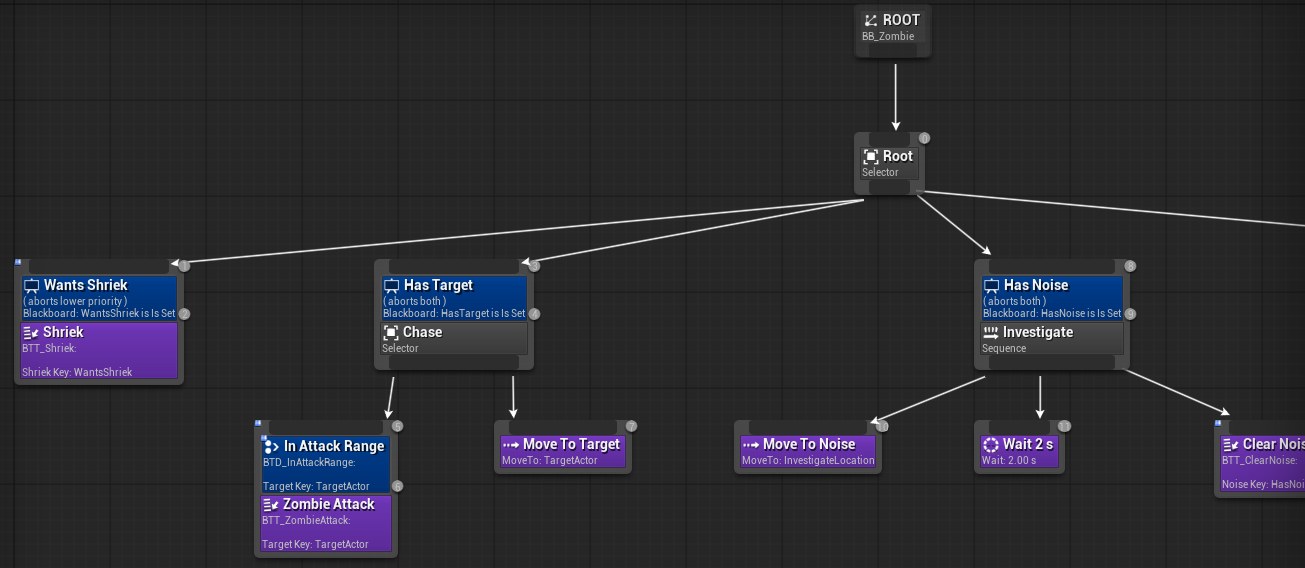
- In
BT_Zombie, drag from the bottom of the Root selector and pick BTT_Shriek. - Move the new node to the left of Has Target / Chase. A selector tries its children from left to right and runs the first one allowed, so the shriek must come before the chase.
- Select it. In Details, set Shriek Key to
WantsShriek, and Node Name toShriek. - Right-click it, Add Decorator, Blackboard. Select the decorator and set:
| Setting | Value | What it does |
|---|---|---|
| Blackboard Key | WantsShriek |
the key it watches |
| Key Query | Is Set | for a Bool: true |
| Notify Observer | On Result Change | reacts when the key changes |
| Observer aborts | Lower Priority | when the key turns true, the branches to its right (the chase) stop, and the shriek runs |
| Node Name | Wants Shriek |
its label in the tree |
- Save.
When the task finishes, the selector starts again from the left. The key is now false, so it runs the chase.
6. The trigger, in the controller
- Open
Blueprints/AI/AIC_Zombie, functionSendPackAlert. It runs once at the start of each chase, when the zombie first takes a target, and callsAlertPack. - After
AlertPack, add:- A Branch on Get Shriek Seconds of the
DefofZombie(the controller's variable) >0. - True: Get Blackboard (target: self), Is Valid, then Set Value as Bool on it,
with Key Name
WantsShriekand Bool Value ticked.
- A Branch on Get Shriek Seconds of the
- Compile and save.
Only the Shrieker has a ShriekSeconds above 0, so every other zombie skips the branch.
7. Put one in a map
Add DA_Zombie_Shrieker to the Archetypes of a
population volume of L_World, or to a
spawn plan on a small map of your own.
Check that it works
- Play with two players.
- In the host's console,
ke * ShowZombieDebug 1draws each zombie's mode, its sight and hearing ranges, and the line to what it is after. - Walk the client's survivor into the Shrieker's sight. It turns to Chase and cries, stands still for two seconds, then comes, in both windows.
- Zombies within 30 m of it walk to where it saw you.
- Set
ShriekSecondsto 0 onDA_Zombie_Shriekerand play again: it comes at once.
A player joining late has not been tried.
What the players see
The task runs on the host. The clients see the Shrieker stand still because its movement is
replicated. They hear the cry because every machine plays the archetype's AlertSound when the
zombie's replicated mode turns to Chase. That is the cry every zombie has: give the Shrieker's
archetype its own AlertSound to tell it apart. The cry itself has not been listened to.
If your behaviour must show something else, set a replicated variable of BP_Zombie on the host and
react to it in its OnRep_ function, as
Add a replicated action does step by step with a counter.
For a clip, call BP_Zombie.PlayMotionGesture on the host: it plays an animation sequence in the
gesture slot on every machine.
If it does not work
- It never stops: the decorator's Observer aborts is not Lower Priority, its key is not
WantsShriek, or the node is to the right of the chase. OrShriekSecondsis 0 on the archetype the zombie really uses: check its Def. - It stops and never comes: Finish Execute is not reached. The cast failed, or the Delay is not wired to it.
- It stops again and again during one chase: Shriek Key is not set on the node in the tree, so the task never clears the key.
- It shrieks, but no other zombie comes: they are further than
PackAlertRadius, measured from the Shrieker.