Add a replicated action
You add a noise barrel: a metal barrel that survivors bang to draw the zombies away from where they
are. You need a gameplay tag, a timed action and a child Blueprint of BP_Interactable.
The gesture follows the template's network rules. The player's machine only asks. The host checks and applies, and the result reaches every machine as replicated state. Architecture describes that path, so read it first.
Steps
1. Declare the tag
- Open Edit > Project Settings > Gameplay Tags, then Manage Gameplay Tags.
- Add
Action.Barrel.Bangnext to the otherAction.*tags. The tags are kept inConfig/DefaultGameplayTags.ini.
2. Create the action
- Open
Content/ZombieSurvival/DataAssets/Actions/Childs/. - Duplicate
DA_Action_GeneratorToggleand name the copyDA_Action_BarrelBang. It is already a short gesture on an object: the survivor walks to it (bApproachTarget) and the reach is 160 uu (Range). - Open the copy and set:
| Field | Value | What it does |
|---|---|---|
ActionTag |
Action.Barrel.Bang |
the tag of step 1; the barrel recognises its action by it |
DisplayName |
Bang |
the name in the action queue on screen |
BaseDuration |
1.5 |
seconds before the effect, with a progress bar above the survivor |
bRequireClearLine |
ticked | refused through a wall |
bCancelOnMove |
ticked | walking away cancels it |
Save.
3. Register it
- Open
DA_ActionRegistry_Default, in the same folder. - Add
DA_Action_BarrelBangtoActionDefs. - Save.
The host refuses any action that is not in this registry, with This action is not allowed.
4. Create the Blueprint
- Open
Content/ZombieSurvival/Blueprints/Interactables/. - Right-click
BP_Interactable, Create Child Blueprint Class, and name itBP_NoiseBarrel. - Open it. In Components, select
Meshand set its Static Mesh toMeshes/Environments/Props/SM_Prop_Barrel.
BP_Interactable already implements BPI_ActionTarget, the context menu and the reach checks. The
child only adds its own action.
5. Add the variables
In My Blueprint, add these variables. Put the first two in a category No Edit, with
Instance Editable unticked, and the other four in Settings, with it ticked.
| Variable | Type | Default | What it is |
|---|---|---|---|
BangCount |
Integer | 0 | how many times the barrel was banged. Set its Replication to RepNotify: the host writes it, every machine receives it |
LastBangTime |
Float | -100 | when it was last banged, on the host |
CooldownSeconds |
Float | 4 | how long it refuses after a bang |
BangSound |
Sound Base (object reference) | Audios/Interactions/SW_Craft_Hammer |
the sound of a bang |
BangAttenuation |
Sound Attenuation (object reference) | Audios/SA_Default |
how far the sound carries |
NoiseTag |
Gameplay Tag | Noise.Craft.Hammer |
what the zombies hear. It must be a row of the noise table, DA_NoiseSettings_Default |
Leave Replication on None for the other five. Setting BangCount to RepNotify creates the
function OnRep_BangCount. Compile.
6. The menu entry
- In My Blueprint, Functions, Override, pick Collect Entries. An event
Event Collect Entries appears in the Event Graph. Its
Whooutput is the survivor who opens the menu. - From it, call Add Action Entry, a function of
BP_Interactable, with Who =Who, Tag =Action.Barrel.Bang, Label =Bang the barreland Params = a Make S_ActionParams node with its defaults.
Add Action Entry finds the action by its tag and runs your check at once, so an entry that would
be refused shows its reason.
7. The check, on the host
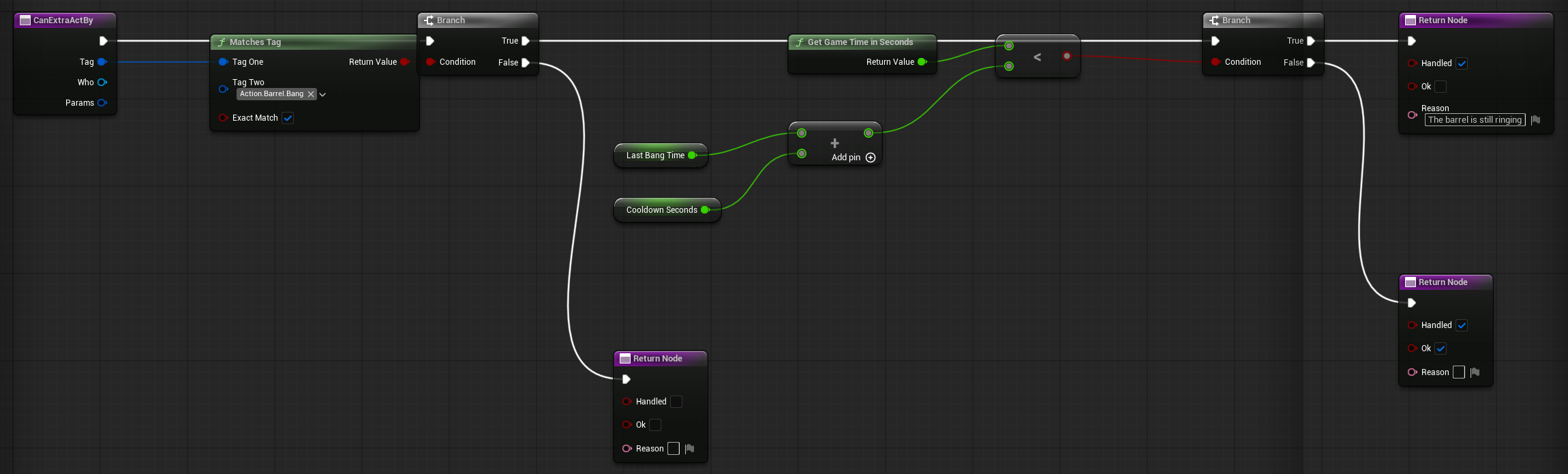
Override Can Extra Act By. It receives Tag, Who and Params, and returns bHandled, bOk
and Reason. Build:
- Matches Tag with Tag One =
Tag, Tag Two =Action.Barrel.Bangand Exact Match ticked, then a Branch on its result. - On False, the tag belongs to another action: Return with
bHandledunticked. The parent class then handles the tag as usual. - On True, a second Branch on Get Game Time in Seconds <
LastBangTime+CooldownSeconds.- On True, Return with
bHandledticked,bOkunticked and Reason =The barrel is still ringing. - On False, Return with
bHandledandbOkticked.
- On True, Return with
The host calls this check when the request arrives and again when the time is up. A refusal sends its reason to the player who asked.
The label of step 6 and the reason are plain text. If you
translate the game, make them entries of the string tables ST_HUD and
ST_Messages, as the template's own texts are.
The pictures of steps 7 to 9 show each graph cut into rows, read from top to bottom: a wire that leaves a row on the right comes back on the left of the next. Click a picture for the graph in one piece.
8. The effect, on the host
Override Extra Act By. It receives Tag, Who and Params, and returns bHandled and
bDone.
- The same Matches Tag and Branch as in step 7. On False, Return with both unticked.
- On True:
- Set
LastBangTimeto Get Game Time in Seconds. - Set
BangCounttoBangCount+ 1. Because the variable is RepNotify, the node is Set w/ Notify: it runsOnRep_BangCounton the host, and the new value reaches every client, whereOnRep_BangCountruns too. - Call
AlertZombies(step 9). - Return with
bHandledandbDoneticked.
- Set
The barrel is dormant on the network, like every interactable. A Set on a replicated variable of the actor wakes it, so nothing more is needed.
In the picture, the 1 comes from a Make Literal Int node. Typing 1 in the second pin of + does the same.

9. The noise the zombies hear
Add a function AlertZombies. It does what every noise source of the template does:
- Get Game Mode, then Cast To BP_ZSGameMode.
- On the cast result, Noise Loudness with Source Tag =
NoiseTag. It reads the loudness of that row in the noise table. - Get All Actors Of Class with Actor Class =
BP_Zombie, and a For Each Loop on the result. - In the loop body, Get Controller of the element, Cast To AIC_Zombie, then
Hear Noise From on it, with Location = Get Actor Location (of the barrel),
Loudness = the loudness of step 2 and Source Tag =
NoiseTag.
Each cast goes on only when it succeeds, so no Is Valid node is needed. Each zombie decides on its
own whether the noise reaches it, from its hearing range and the loudness. The function runs on the
host only, because Extra Act By does.

10. The sound on every machine
Open OnRep_BangCount:
- A Branch on Get Game Time Since Creation >
1.0. - On True, Play Sound at Location with Sound =
BangSound, Location = Get Actor Location and Attenuation Settings =BangAttenuation.
The branch is for a player who joins later. Their copy of the barrel is created with the current
count, and OnRep_BangCount runs once at that moment. Without the branch, they would hear a bang
that happened before they arrived. A player joining late has not been tried.
Compile and Save.
11. Put one on Pine Hollow
- Open
Content/ZombieSurvival/Maps/L_World. The editor loads the North quarter. - Drag
BP_NoiseBarrelinto the map, on the pavement next to the fourPlayerStartactors of that quarter. - Save the map with File > Save All. On a World Partition map the barrel is saved in a file of its own.
Check that it works
Play with two players in the editor, a host and a client.
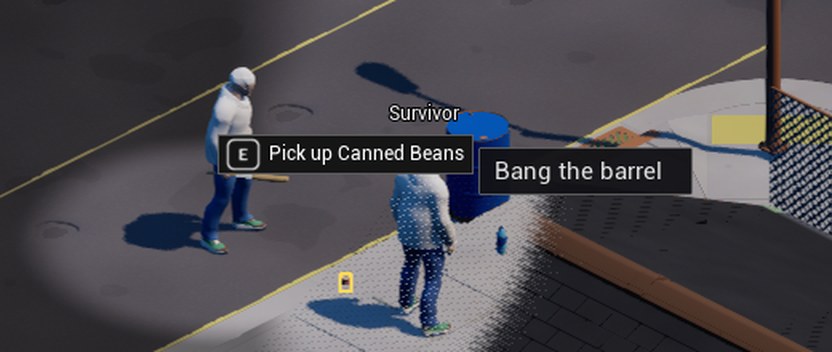
- In the client's window, tap Right mouse on the barrel. The menu offers Bang the barrel.
- Pick it. The client's survivor walks to the barrel, a bar fills above it for one and a half seconds, Bang shows in the action queue, then the sound plays in both windows.
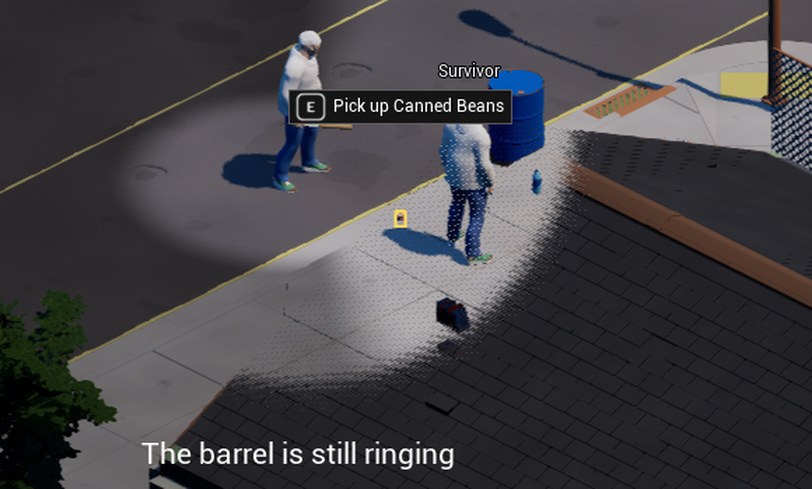
- Pick it again while the first bang runs. When the second one ends, the host refuses it, and the client reads The barrel is still ringing.
- Bang it from the host's window. The client hears it too.
- A zombie within earshot, 10 m away for example, turns and walks to the barrel.
If it does not work
- The menu has no entry:
Event Collect Entriesis not wired, or the tag in Add Action Entry does not matchActionTagof the action exactly. - The host answers "This action is not allowed":
DA_Action_BarrelBangis not inActionDefsofDA_ActionRegistry_Default. - The entry is there but always greyed, or refused with another reason: the parent's checks ran
instead of yours, because
Can Extra Act ByreturnsbHandledunticked for your tag. - The host hears it, the client does not:
BangCountis not RepNotify, or the sound is played inExtra Act Byinstead ofOnRep_BangCount.Extra Act Byruns on the host only. - No zombie comes: they are too far for that row of the noise table. Try a louder
NoiseTag, such asNoise.Gunshot.Pistol, or stand closer. Tune the systems lists the rows and their radii. - The check never refuses:
LastBangTimeis not set inExtra Act By, orCooldownSecondsis 0 on the placed barrel. - Even the first bang is refused with The barrel is still ringing:
LastBangTimeis set inCan Extra Act Byinstead ofExtra Act By. The check runs before the effect and again when the time is up, so it must not start the cooldown.
Keep the count across a save
The barrel's count is not saved. Every state the world save keeps follows one path, and the fuel pumps are its smallest example. To keep the count, add the same three pieces:
| Piece | The pumps | The barrel |
|---|---|---|
A struct of the saved state, keyed by the actor's SaveId |
Blueprints/Structs/S_SavedPump (SaveId, Stock) |
S_SavedBarrel (SaveId, BangCount) |
| An array of that struct in the world save | SvPumps on Blueprints/Core/SG_World |
SvBarrels |
Two functions of Blueprints/ActorComponents/AC_WorldPersistence, the component of the game mode that writes and reads the world |
CollectPumps, when the host saves; RestorePumps, after a load |
CollectBarrels, RestoreBarrels, called next to them |
CollectBarrels walks the placed barrels and adds one row per barrel. RestoreBarrels finds each
barrel by its SaveId and sets BangCount back. Both run on the host: the clients receive the
count through its replication, as in play.
BP_Interactable already carries a SaveId. After you place barrels in a map, run
Assign Save Ids and Validate Save Ids, as
Save, load and death shows, then check in the Details panel that
each barrel has one.
Leave SaveVersion of SG_World as it is: a world saved before your change loads, with the new
array empty. Raising it makes the game refuse the older saves. A field added to an existing
S_Saved* struct follows the same rule, but renaming or retyping a field loses the value saved
under it.
Do not copy the generator of the large map. It is saved another way, by BP_ZoneManager
(SaveGenerators, LoadGenerators), an actor that exists only on a World Partition map such as
Pine Hollow.