Add a firearm
You add a Compact Pistol: a lighter, weaker handgun that fires the pistol's rounds, takes the
pistol's 12-round magazine and the laser sight, and is carried at the belt or the holster. A gun is
two Data Assets that point at each other: an item (PDA_ItemDef, what lies in the bag) and a weapon
definition (PDA_WeaponDef, its numbers). The how-to page
Add a firearm lists every field.
Steps
1. Duplicate the pistol's item
- Open
Content/ZombieSurvival/DataAssets/Items/Childs/. - Duplicate
DA_Item_Pistoland name the copyDA_Item_CompactPistol. - Set:
| Field | Value |
|---|---|
DisplayName |
Compact Pistol |
Description |
A small pistol. Light to carry, short to aim. |
ItemSaveId |
CompactPistol (unique: the copy still says the pistol's id) |
Weight |
lower than the copy's, 0.77 for example |
Keep Category on Weapon and the floor mesh of the pistol. Save.
2. Duplicate the pistol's weapon definition
- Open
Content/ZombieSurvival/DataAssets/Weapons/Childs/. - Duplicate
DA_Weapon_Pistoland name the copyDA_Weapon_CompactPistol. - Set:
| Field | Value | What it does |
|---|---|---|
Item |
DA_Item_CompactPistol |
the item that stands for this gun in the bag |
Damage |
60 |
hit points per round (the pistol does 80) |
Range |
1100 |
reach in uu (the pistol carries 1400) |
Check that the copy kept the firearm fields you want:
| Field | Keep | Why |
|---|---|---|
bIsFirearm |
ticked | the left click shoots instead of swinging |
FeedType |
Magazine |
fed by a detachable magazine |
Caliber |
DA_Caliber_Pistol |
it fires pistol rounds |
CompatibleMagazines |
DA_Magazine_Pistol |
the magazine it accepts |
AttachmentSlots |
the pistol's | the laser goes on the Barrel slot |
CarryKind |
Handgun |
which weapon positions take it |
ShotNoise |
Noise.Gunshot.Pistol |
how far the shot carries to zombie hearing |
Save. The held meshes stay the pistol's, so the Barrel socket the laser needs is already there.
There is no weapon position to edit. Handgun is accepted by the two belt positions, by the holster
while a holster is worn, and by the back, which takes anything.
To fire a round of its own instead of the pistol's, the gun needs a calibre, with its loose round and its box, and a magazine of its own if it takes one.
3. Point the item at its weapon definition
Open DA_Item_CompactPistol again and set WeaponDef to DA_Weapon_CompactPistol. The two
references are read in both directions. Save.
4. Let the pistol magazine fit it
- Open
DA_Magazine_Pistol, inContent/ZombieSurvival/DataAssets/Weapons/Childs/. - Add
DA_Weapon_CompactPistoltoCompatibleWeapons. Save.
The weapon and the magazine must each list the other.
5. Let the laser sight fit it
- Open
DA_Attachment_Laser, in the same folder. It listsDA_Weapon_PistolandDA_Weapon_Revolver. - Add
DA_Weapon_CompactPistoltoCompatibleWeapons. Save.
Its RequiredTool is DA_Item_Screwdriver: the survivor needs one in the bag to mount it.
6. Register the item
Open DA_ItemRegistry_Default, in the items folder of step 1, and add DA_Item_CompactPistol to
ItemDefs. Save. Only items are registered: nothing else needs a list.
7. Put it in the loot of Pine Hollow
Open Content/ZombieSurvival/DataAssets/Loot/Childs/DA_LootTable_Bedroom, which lists the pistol
and the revolver. Add an entry with ItemDef = DA_Item_CompactPistol, MinCount and MaxCount =
1, and the same Weight as the pistol's row. Save. A new Pine Hollow world rolls it.
The loot of Pine Hollow has not been tried with this gun.
8. Try it
- Open
Content/ZombieSurvival/Maps/L_Worldand press Play. - Press T and give yourself the gun and what goes with it, one line each:
/give CompactPistol,/give PistolMagazine,/give AmmoPistol 24,/give Laserand/give Screwdriver. - Right-click the pistol magazine in the bag and pick Fill magazine. Rounds go in one by one,
0.5 s each, up to
12/12. - Left-click the Compact Pistol's row to equip it.
- Right-click the pistol magazine and pick Insert into the gun. It goes into the gun in hand, and
the slide is racked for you. The counter reads ready + chamber:
11+1. - Hold Right mouse to aim and shoot with Left mouse. One shot leaves
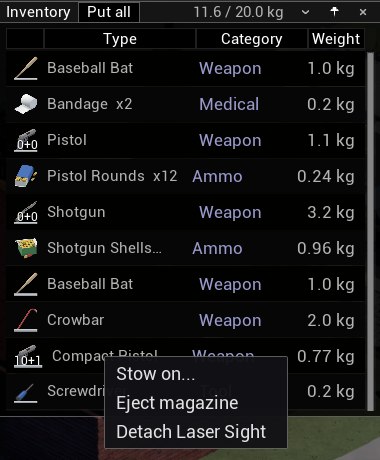
10+1. The shot makes the pistol's noise, and the zombies that hear it come. - Right-click the laser sight in the bag and pick Attach to Compact Pistol. The gun's menu now offers Detach Laser Sight. While you aim at a zombie within range, a red dot marks it.
- Right-click the gun, pick Stow on…, then Belt (left) or Belt (right). Press 1 or 2 to draw it again: it takes the position's draw time.
- Press R for the automatic reload, or hold it for the reload ring.
Filling a magazine and mounting an attachment play the generic gesture: they have no clip of their own. The red dot and the reload with R have not been tried.
9. Check that it survives a save
- Open
Content/ZombieSurvival/Maps/L_Boot. Start it as a Standalone Game (the arrow next to Play): in the editor's own Play, Esc stops the game instead of opening the pause menu. - Start a NEW GAME. Give yourself the gun as in step 8, load it and mount the laser.
- Esc, SAVE GAME, MAIN MENU, then CONTINUE. The gun is still in the bag with its magazine, its count, its round in the chamber and the laser.
This step has not been played as written.
If it does not work
- The left click swings it like a club:
bIsFirearmis not ticked onDA_Weapon_CompactPistol. - It has the pistol's numbers:
WeaponDefof the item still points atDA_Weapon_Pistol. - No Insert into the gun entry: the gun is not in hand, or the magazine's
CompatibleWeaponsor the weapon'sCompatibleMagazinesis missing the other. - No Attach to entry on the laser sight:
DA_Attachment_Laserdoes not list the gun, the gun has noBarrelslot inAttachmentSlots, or there is no screwdriver in the bag. - No red dot: the dot shows only while you aim, and only on a zombie or another target in the line
of fire, within the gun's
Range. - No belt position offered:
CarryKindis notHandgun. - The gun is gone after CONTINUE: the item is missing from
ItemDefs, or itsItemSaveIdis still the pistol's. - It jams a lot:
JamChanceis the copy's. Wear raises it (JamWearFactor4 inDA_Firearm_Default), and so does the Firearm jams game option.