Add a zombie
You add a Foreman: a zombie that shuffles slowly, takes more hits than the others and hits doors harder. You create its definition, register it, add it to the population of Pine Hollow and check it in game. The how-to page Add a zombie archetype lists every field.
Steps
1. Declare its tag
- Open Edit > Project Settings > Gameplay Tags.
- Add the tag
Zombie.Archetype.Foremannext to the shippedZombie.Archetype.Resident,.Worker,.Guard,.Medicand.Hiker. The tags are kept inConfig/DefaultGameplayTags.ini.
2. Duplicate a shipped archetype
- Open
Content/ZombieSurvival/DataAssets/Zombies/Childs/. - Right-click
DA_Zombie_Guard, Duplicate, and name the copyDA_Zombie_Foreman.
The copy keeps the Guard's sounds, its blood effect and its bodies. No zombie art ships:
BodyVariants lists the survivors' two mannequins, Manny (SK_Character_Male) and Quinn
(SK_Character_Female), in a zombie skin. A model of your own is a
skeletal mesh on Meshes/Characters/SKEL_Mannequin, listed in BodyVariants.
3. Fill the fields
Open DA_Zombie_Foreman and set the fields of the table. The picture shows them on another
archetype, DA_Zombie_Runner.
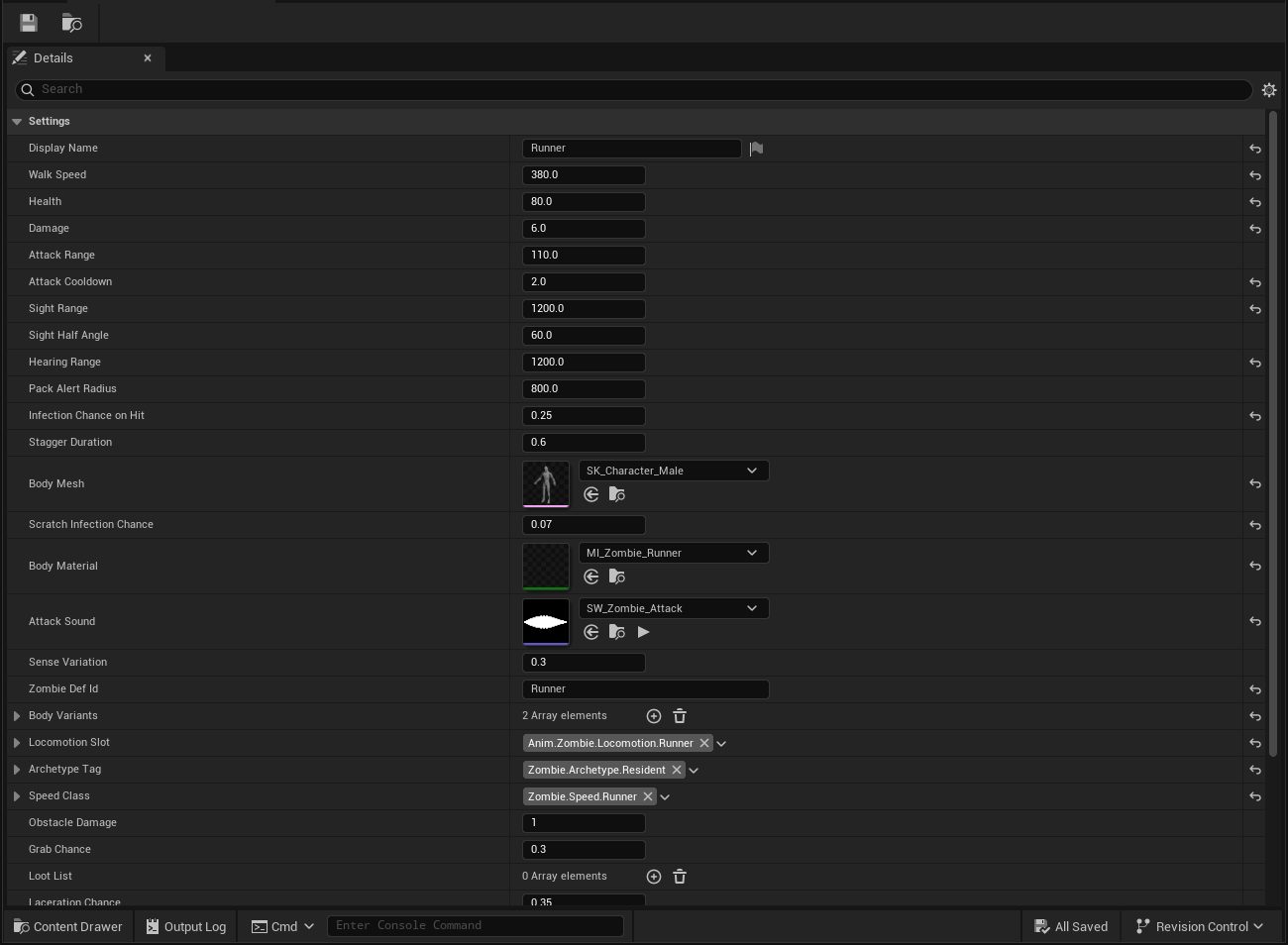
| Field | Value | What it does |
|---|---|---|
ZombieDefId |
Foreman |
the key the save stores for this archetype; it must be unique |
DisplayName |
Foreman |
label used in debug and in your own tools |
ArchetypeTag |
Zombie.Archetype.Foreman |
the tag of step 1 |
SpeedClass |
Zombie.Speed.Slow |
a fixed speed class (empty: each zombie draws one by weight) |
LocomotionSlot |
Anim.Zombie.Locomotion.Slow |
the gait that matches that speed |
Health |
250 |
hit points (a pistol round does 80 before zone and critical) |
ObstacleDamage |
twice the copied value | damage of one hit on a door, a window, a barricade or a built piece |
Keep the other numbers of the Guard for now: attack, sight and hearing, infection chances,
SenseVariation. Save.
Change ZombieDefId
The copy still has the Guard's id, Guard. Two archetypes with the same id cannot be told apart
on load: your zombies come back from a save as Guards.
4. Give it something to carry (optional)
LootList holds what the archetype may carry: one row per item, with a chance and a minimum and
maximum count. Add a row with ItemDef = DA_Item_Hammer, using the copied rows as a model for the
chance.
The list is rolled for the zombies a spawn plan places, and players find the item on the body. On Pine Hollow it is not rolled: the zombies sown by the population volumes carry nothing, the Foreman of step 7 included.
5. Give it a hard hat (optional)
Each entry of BodyVariants has a Mesh, its Materials slot by slot, and Outfits, meshes that
follow the body.
- In the Manny entry, add
SK_Cloth_HardHat_MaletoOutfits. - In the Quinn entry, add
SK_Cloth_HardHat_Female.
The host draws one entry per zombie. No shipped archetype fills Outfits, so this is the least
exercised part of the system: if the hat looks wrong, empty the arrays again.
6. Register it
- Open
DA_ZombieRegistry_Default, in the same folder. - Add
DA_Zombie_ForemantoZombieDefs. - Save.
The save finds an archetype through this registry by its ZombieDefId.
7. Add it to the population of Pine Hollow
No zombie is placed by hand on Pine Hollow. Its zombies are sown once per new world by the four
population volumes placed in L_World, each with the
weights of the archetypes it draws.
- Open
Content/ZombieSurvival/Maps/L_World. - In the Outliner, select the population volume of the North quarter,
PV_NorthQuarter. - In its Details panel, add a row to
Archetypes:DA_Zombie_Foreman, with a weight as high as the heaviest row, so that it comes up often. - Save the map with File > Save All.
This step has not been played as written: the Foreman was checked on a map populated by a spawn plan.
A small map without a zone manager takes its zombies from a
spawn plan instead: one entry of ZombieSpawns per zombie,
with its place and Def = DA_Zombie_Foreman.
8. Try it
- Open
Content/ZombieSurvival/Maps/L_Boot, press Play, then NEW GAME with the North quarter start point, START, create a character and PLAY. - Walk away from the start point: no zombie is sown within 80 m of it (
SpawnClearance). Among the zombies of the quarter, a Foreman shuffles at the slow gait, 60 uu/s, with its hard hat if you gave it one. A Resident walks at the same speed, so tell the Foreman apart by its health. - Fight it with the bat. With 250 health it takes clearly more blows than a Resident, which has
- A head hit does double damage, a leg hit less.
- Optional: open the console and type
ke * ShowZombieDebug 1. In a development build it draws each zombie's mode, its sight and hearing ranges, and the line to what it is after. It draws nothing in a shipping build.
9. Check that it survives a save
- Open
Content/ZombieSurvival/Maps/L_Boot. Start it as a Standalone Game (the arrow next to Play): in the editor's own Play, Esc stops the game instead of opening the pause menu. - Start a NEW GAME, find a Foreman and hit it once.
- Esc, SAVE GAME, MAIN MENU, then CONTINUE. The Foreman is where it stood, still slow and still wounded.
This step has not been played as written: the save was checked on an unwounded Foreman, which came back with its 250 health.
If it does not work
- No Foreman in sight: the map was not saved after you changed the volume, the world was created before your change, or the row's weight is low against the others.
- Its feet slide:
SpeedClassandLocomotionSlotdo not match. The gait is played at the zombie's speed divided by the slot'sReferenceSpeed. - Its speed varies from one Foreman to the next:
SpeedClassis empty, so each zombie draws a class by weight. - It comes back wrong after a load: it is missing from
ZombieDefs, or itsZombieDefIdis stillGuard. - The tag is not offered in the picker: declare it first (step 1).
- Its senses feel random: each zombie rolls its own sight and hearing within
± SenseVariationof the archetype's values. SetSenseVariationto0for exact senses.