Difficulty and presets
The difficulty of a world is its game options, such as the zombie population or the speed of needs. A preset fills them all at once, and the player can then adjust each option within its bounds. You add a fourth preset, Nightmare, and widen the bound of one option.
Options are chosen once, when a world is created, and no screen changes them afterwards. Changing a preset changes the next new world, never a saved one.
Steps
1. Duplicate a preset
- Open
Content/ZombieSurvival/DataAssets/Sandbox/Childs/. - Duplicate
DA_SandboxSettings_Unforgivingand name the copyDA_SandboxSettings_Nightmare.
The values of the three shipped presets are compared on Tune the systems.
2. Name and tune it
Open DA_SandboxSettings_Nightmare and set:
| Field | Value |
|---|---|
DisplayName |
Nightmare |
Description |
Three times the zombies, needs twice as fast, half the experience. |
Settings > Population > ZombieMultiplier |
3 |
Settings > Character > NeedsRateMultiplier |
2 |
Settings > Character > XPMultiplier |
0.5 |
Keep the other options of Unforgiving. Each value has to stay within the Min and Max of its row in
the catalog you open in step 3: check the three rows before you save.
3. Offer it
- Open
DA_SandboxCatalog_Default, in the same folder. - In
Presets, add an element at the end and pickDA_SandboxSettings_Nightmare. - Leave
DefaultPreseton Standard, or set it to Nightmare to have it selected first. - Save.
4. Widen a bound
Here you let players push the population past what the catalog allows.
- In
OptionRowsofDA_SandboxCatalog_Default, find the row whoseOptionTagisSandbox.Population.ZombieMultiplier. - Note its
Max, then raise it, by 2 for example. KeepStepas it is: + and − move the value by one step. - Save.
A bound limits what the options screen lets a player pick. Changing it does not change a preset or a saved world.
5. Try it
- Open
Content/ZombieSurvival/Maps/L_Bootand start it as a Standalone Game (the arrow next to Play). In the editor's own Play, Esc stops the game instead of opening the pause menu, which step 8 needs. - NEW GAME, then GAME OPTIONS.
-
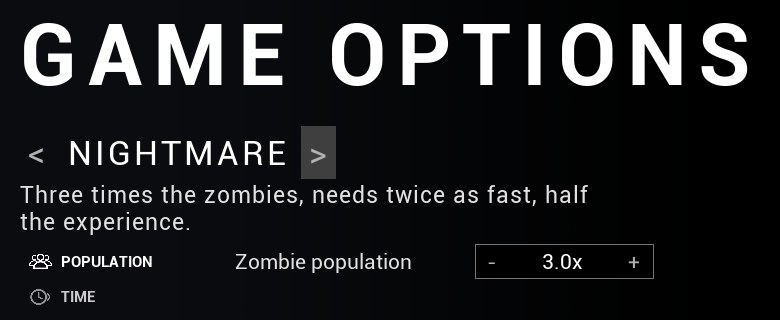
Step the preset with the arrows on each side of its name. Nightmare comes after the three shipped presets, with its sentence.
-
Pick it. The population, needs and experience rows show 3.0x, 2.0x and 0.5x.
- Press the + of the population up to its new
Max. The + greys there. - Set it back to
3, then DONE, START, create a character, PLAY. - Pine Hollow is sown with three times its population, about 900 zombies instead of 301. Away from the start point, the streets are visibly more crowded. This count has not been checked on Pine Hollow.
- Press Esc, then MAIN MENU. LOAD lists the world with its preset, Nightmare.
The same screen opens from HOST, New world, for a world played together. A saved world that you host shows its options in GAME OPTIONS but lets nothing change.
If it does not work
- Nightmare is not offered: it is not in
Presetsof the catalog, or the catalog was not saved. - Its values are not what you set: you edited the Unforgiving asset instead of the copy, or a value lies outside the bounds of its row.
- Nothing changes in a world you continued: a world keeps the options it was created with. Start a new one.
- Nothing changes when you press Play on a map: a world started without the menu uses
SandboxDefaultsonBP_ZSGameMode, which points at the Standard preset. Go through NEW GAME, or pointSandboxDefaultsat your preset.
Where the options are kept
| What | Asset | Notes |
|---|---|---|
| The three presets | DA_SandboxSettings_Default (Standard), DA_SandboxSettings_Easygoing and DA_SandboxSettings_Unforgiving, in Content/ZombieSurvival/DataAssets/Sandbox/Childs/ |
each a PDA_SandboxSettings: a DisplayName, a Description of one sentence, and Settings, the options of a new world |
| The list of options | DA_SandboxCatalog_Default, in the same folder |
Presets (the presets offered), DefaultPreset (the one selected first), Categories (the tabs) and OptionRows, one row per option |
| One option row | an S_SandboxOptionRow of OptionRows |
OptionTag, GroupLabel, Label, Tooltip, Min, Max, Step, Unit, and bToggle for a check box |
| The catalog in use | SandboxCatalog on Blueprints/Core/BP_ZSGameInstance |
points at DA_SandboxCatalog_Default |
| A world started without the menu | SandboxDefaults on Blueprints/Core/BP_ZSGameMode |
points at DA_SandboxSettings_Default; used when you press Play on a map in the editor |
| The options of the running game | BFL_ZSSandbox.GetActiveOption(<tag>) |
what every system reads, the same for the host and every player; never a preset asset |
Many rows take their label and tooltip from ST_Menus, keyed by the option tag:
Sandbox.Zombies.Speed, with its tooltip under Sandbox.Zombies.Speed.Tip.
The options and their bounds
The catalog holds one row per option tag. A tag is its group followed by its name, as in
Sandbox.Zombies.Speed.
| Group | Options |
|---|---|
Sandbox.Population |
ZombieMultiplier |
Sandbox.Time |
StartHour, DayLength, StartMonth, NightDarkness |
Sandbox.Character |
NeedsRateMultiplier, XPMultiplier, WoundSeverity, ClothingHoles, TemperatureEffects |
Sandbox.Weather |
Frequency |
Sandbox.Building |
ConstructionDurability, AllowDemolition |
Sandbox.Weapons |
JamMultiplier |
Sandbox.Players |
PlayerDamage |
Sandbox.Vehicles |
FuelConsumption, StartCondition, StartFuel, Locks, Alarms, EasyUse |
Sandbox.World |
Events, FoodLoot, WeaponLoot, OtherLoot, PowerShutoff, PowerShutoffDay, WaterShutoff, WaterShutoffDay |
Sandbox.Zombies |
Speed, Strength, Toughness, Sight, Hearing, Memory, OpenDoors, CrawlerShare, BackBites, GroupTakedown, FencesCollapse, CorpseMinutes |
Sandbox.Food |
SpoilRate, NatureAbundance |
The bound of an option is the Min and Max of its row: open the row to read it. This manual gives
three of them. Construction strength goes from 0.25 to 2, Firearm jams (JamMultiplier) from 0 to
2, and each of the three loot options from 0 to 2. On the options screen, the + or − of an
option is greyed at its bound.
An option of your own takes five small steps and no screen work.