Add a buildable piece
You add a Reinforced Wooden Wall: the shipped wooden wall with a higher cost and twice the hits. It needs no new art. You create the piece, list it in the build book, place it, dismantle it and find it again after a save. The how-to page Add a buildable piece lists every field.
Steps
1. Duplicate the wooden wall
- Open
Content/ZombieSurvival/DataAssets/Building/Childs/. - Duplicate
DA_Buildable_Walland name the copyDA_Buildable_ReinforcedWall.
The copy keeps the wall's mesh, icon, category, hammer, timed action and sound, so the piece looks like the plain wall.
2. Fill the fields
Open DA_Buildable_ReinforcedWall and set:
| Field | Value | What it does |
|---|---|---|
DisplayName |
Reinforced Wooden Wall |
the name in the build window and in the placement prompt |
Description |
A wall of doubled planks. Slow to build, slow to break. |
the detail column |
BuildId |
ReinforcedWoodWall |
the save key of every placed copy; it must be unique |
Cost |
two rows: DA_Item_Plank x 6, DA_Item_Nails x 10 |
consumed on placement |
MaxHits |
120 |
zombie hits it takes, before the builder's skill and the host's Construction strength option |
MinLevel |
0 |
Carpentry level asked; keep 0 for the first test |
Check that the copy kept:
| Field | Keep |
|---|---|
SkillTag |
Skill.Carpentry |
Material |
Wood |
Footprint |
Edge: a wall sits on an edge of the 300 uu grid the world is built on |
PieceClass |
empty: an empty class places BP_Built |
GridSnap |
300 |
bPlaceable |
ticked |
bKnownByDefault |
ticked, so every character knows it |
Save.
Change BuildId
The copy still has WoodWall, the id of the plain wall. With the same id, the save cannot tell
your wall from the plain one.
3. List it in the build book
- Open
DA_BuildBook_Default, in the same folder. - Add
DA_Buildable_ReinforcedWalltoBuildables. - Save.
A piece missing from Buildables is never listed in the build window.
4. Try it
- Open
Content/ZombieSurvival/Maps/L_Worldand press Play. - Press T and give yourself the cost and the tool, one line each:
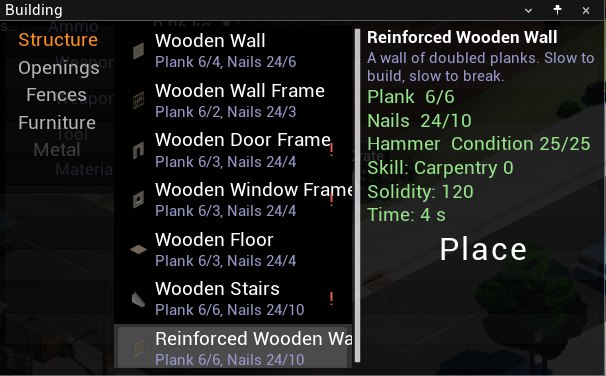
/give Plank 6,/give Nails 24and/give Hammer. - Press B. In the build window, pick Structure. The Reinforced Wooden Wall is listed with its icon and its cost as have/required: Plank 6/6, Nails 24/10.
- Pick it. The detail shows the description, the cost, the hammer and its condition, the skill (Carpentry 0), a solidity of 120 at that level, and the time, 4 s.
- Press Place. A ghost of the wall follows the mouse, with the prompt Place, Turn (X) and Exit (B). X turns it a quarter, and a left click places it.
- The survivor works for the time of the placing action, then the wall stands. Six planks and ten nails left the bag. Press B to leave placing.
Zombies have not been tried against this wall.
5. Dismantle it
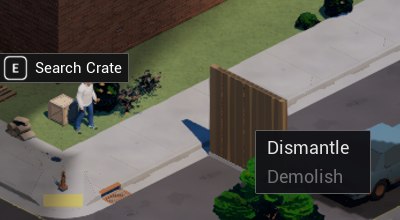
Right-click the wall and pick Dismantle. The survivor walks to it first. Demolish stays greyed unless the host's Demolition option allows it.
With a hammer in the bag, the host rolls a failure first, 30 % at Carpentry 0. On a failure you read
"Dismantling failed". Otherwise you get part of the cost back: each stack times RefundRatio times
the yield of your Carpentry level, rounded down. At Carpentry 0 that is 1 plank and 3 nails.
6. Check that it survives a save
- Open
Content/ZombieSurvival/Maps/L_Boot. Start it as a Standalone Game (the arrow next to Play): in the editor's own Play, Esc stops the game instead of opening the pause menu. - Start a NEW GAME. Give yourself the materials as in step 4 and place a Reinforced Wooden Wall.
- Esc, SAVE GAME, MAIN MENU, then CONTINUE. The wall stands where you left it, and its detail still reads as your piece.
This step has not been played as written.
7. Make it a piece to learn (optional)
- On
DA_Buildable_ReinforcedWall, untickbKnownByDefault. - Either set
LearnAtLevelto a Carpentry level, or add the piece toTeachesPiecesof a magazine (for exampleDA_Book_Magazine_FurnitureFromScrapWood), or toGrantedPiecesof an occupation or a trait. - Raise
MinLevelif you want a skill gate on placing it too. Below it, Place is greyed with "Skill too low".
This step has not been played as written.
If it does not work
- The piece is not listed: it is missing from
Buildables,bPlaceableis off, or it is not known (bKnownByDefaultoff and nothing taught it). - The Place button is greyed: it shows the reason, "Skill too low", "Tool needed" or "Missing materials".
- The ghost is red: "Space occupied" (a wall, a piece or furniture in the box), "Someone is in the way", or "No support" (nothing under its centre, corners and edge middles).
- It comes back as a plain wall after a load:
BuildIdis stillWoodWall. - It sits off the grid:
GridSnapis not300, orZOffsetmoved it.