Add a vehicle
You add a Tourer: the sedan's body with a bigger tank, a lower fuel use, a softer engine and a larger
trunk. A vehicle is a class, a child of BP_VehicleBase with the mesh, the wheels and the mass, and a
Data Asset, a PDA_VehicleDef with everything else. The how-to page
Add a vehicle model and its parts lists the vehicle fields and the
parts.
Steps
1. The mesh
The Tourer keeps the sedan's mesh, so skip this step. It has not been played as written.
A model of your own is a skeletal mesh imported on SKEL_Vehicle, with a physics asset that has one
body on body, made of boxes only, and no body on the wheels. It needs the shared bone names, such
as wheel_fl and door_*, and eight sockets for the seats and the lamps, such as Seat_FL and
Headlight_L. The how-to page lists the bones and the sockets.
2. Duplicate the sedan's class
- Open
Content/ZombieSurvival/Blueprints/Vehicles/. - Duplicate
BP_Vehicle_Sedanand name the copyBP_Vehicle_Tourer. Driving, lamps and sounds come with it. - Keep its mesh and its wheels,
BP_VehicleWheel_Sedan_FrontandBP_VehicleWheel_Sedan_Rear. For other wheel sizes, duplicate a wheel pair and change its radius and width. - Leave it open. You set its
VehicleDefin step 5.
3. Duplicate the sedan's data
- Open
Content/ZombieSurvival/DataAssets/Vehicles/Childs/. - Duplicate
DA_Vehicle_Sedanand name the copyDA_Vehicle_Tourer. - Open
ST_HUD, inContent/ZombieSurvival/Localization/, and add the entryVehicle.Tourer=Tourer. - Set the fields below in
DA_Vehicle_Tourer, then save.
| Field | Value | What it does |
|---|---|---|
DisplayName |
the Vehicle.Tourer entry, picked from the text field's options |
the name shown in game; the sedan's reads Vehicle.Sedan |
TankCapacity |
half again the copied value | the fuel the tank holds |
ConsumptionPerKm |
a fifth less than the copied value | the fuel used per kilometre |
BaseEngineTorque |
a tenth less than the copied value | the engine's pull before wear |
VehicleClassBP |
BP_Vehicle_Tourer |
the class this data spawns |
A name read from ST_HUD can be translated.
Keep ClassId on VehicleClass.Standard. The class decides which parts fit and which magazine
teaches the car, here DA_Book_Magazine_VehicleClass_Standard. Keep SeatSockets and SeatWindows
(one per seat), StartPartDefs (one part per slot) and MechScheme (the top view of the Mechanics
panel).
4. A bigger trunk
- Open
Content/ZombieSurvival/DataAssets/Vehicles/Containers/. - Duplicate
DA_VehicleContainer_Sedan_Trunkand name the copyDA_VehicleContainer_Tourer_Trunk. - Raise its
Capacityabove the sedan's 60 kg, to 90 for example. KeepLabel,Offset,bOutsideandReach. - In
ContainerDefsofDA_Vehicle_Tourer, replaceDA_VehicleContainer_Sedan_Trunkwith your copy. Keep the sedan's glove box and its four seats. - Save both.
5. Point the class at its data
In BP_Vehicle_Tourer, set VehicleDef to DA_Vehicle_Tourer. Compile and save. The data names its
class in VehicleClassBP, and the class has to name its data too.
6. Parts
There is nothing to add. The Tourer is of the Standard class, so the Standard parts of
DataAssets/Vehicles/Parts/ fit it. A new part is a PDA_VehiclePartDef plus its item: copy one from
that folder.
7. Put it on a spawn point
A vehicle placed by hand in a map works but is not saved, and it comes back twice after a load. Use a spawn point.
- Open
Content/ZombieSurvival/Maps/L_World. The editor loads the North quarter. - In the outliner folder L_World/Vehicles, select
VehicleSpawn_North_A. It draws the sedan today, parked along the curb within sight of the North quarter start point. - In its Details panel, replace the entry of
VehicleDefswithDA_Vehicle_Tourer. LeaveSpawnChance, the odds that the point draws a car at all. - Save the map.
A spawn point draws its car once per new world.
8. Drive it
- Open
Content/ZombieSurvival/Maps/L_Bootand start it as a Standalone Game (the arrow next to Play). In the editor's own Play, Esc stops the game instead of opening the pause menu, which step 9 needs. - NEW GAME, with the North quarter start point. In GAME OPTIONS, tick Easy vehicles in the Vehicles tab, then DONE, START, create a character and PLAY. The option gives unlocked cars, with the key in the ignition and a full tank.
- Walk to the car parked along the curb, within sight of the start point. If no car stands there, the point drew nothing: start another new world.
-
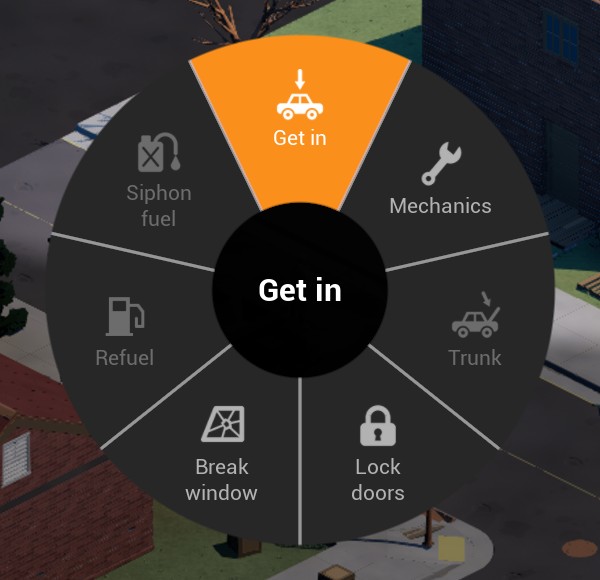
Next to the car, hold F. The outside radial offers seven entries. One that does not apply where you stand is greyed, such as Trunk from the side of the car.
-
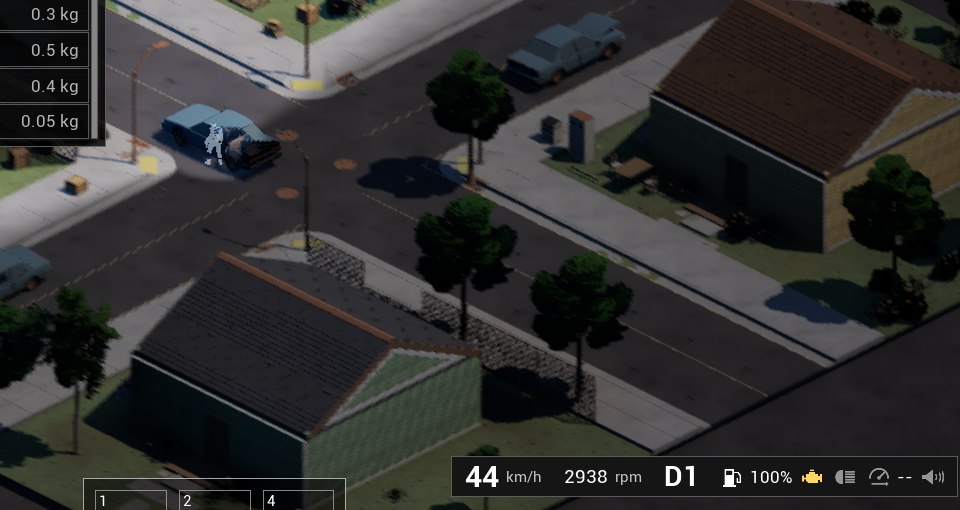
Click Get in while you hold F. I starts the engine, W throttles, S brakes, R and F move the gear lever. The Controls page has every key at the wheel.
-
Stop, get out with E and stand behind the car. In the Nearby window, the arrow next to Ground lists the containers in reach. Pick Trunk and fill it past 60 kg, more than the sedan's trunk takes. Filling the trunk has not been played as written.
A client at the wheel has not been tried with the Tourer.
9. Check that it survives a save
Esc, SAVE GAME, MAIN MENU, then CONTINUE. The Tourer is where you parked it, not back on its spawn point, with its fuel and what you put in the trunk. Only its place was checked after a load, not its fuel or its trunk.
If it does not work
- No car at the point: the world was created before your change, or the point drew no car
(
SpawnChance). Start a new world. - A sedan appears instead:
VehicleClassBPstill namesBP_Vehicle_Sedan, orVehicleDefof the class still namesDA_Vehicle_Sedan. - The name shows a key or is empty: the
ST_HUDentry is missing, or the table was not saved.